HTC One review - part 2: Hardware


Here is the second part of the HTC One review. If you haven't read the first part yet, you can find it here - HTC One review - part 1. Design. This time we will review what lurks under the hood of the HTC One, and help you to decide if this is your chosen top end phone of 2013.
    Overview

    The HTC One is considered by many to be the Android flagship phone of 2013, and has topped the PhoneDog Smartphone Rankings weekly since March 31st. This not only makes it one of the most successful HTC phones of all time, it also means it has been at the #1 spot for longer than even the immensely popular Apple iPhone 5.

    The success of the HTC One can be credited to the major hardware changes and UI overhaul following the criticism received from One X users. Blighted by build quality issues, the HTC One X launch wasn't the revolutionary moment HTC required to stay on top of their finances and 2012 can be considered the year that HTC fell from grace, edging behind Samsung and Apple in sales. Despite this, the HTC One X was by no means a bad device and still has many devoted users. In fact, it recently received the 4.xx.xxx.x software update (a rare feat among HTC phones) that was pushed via OTA and includes Sense 5.0 (more details here).


    Image source: www.beatsbydre.com
    The HTC One needed to be something special. With profits slipping and their partnership with Beats Audio hanging in the balance, HTC put their team to work. They had one goal in mind: to exceed the build quality of the Samsung Galaxy S4, while maintaining the trademark HTC style of rounded corners and a prominent camera lens.

    On February 19th, as rays of sun began to pierce through the cloud which threatened to engulf the capital, the HTC One was officially launched in London. The album from this launch event can be found here.

    As Peter Chou demonstrated the new features of the device to polite rounds of applause, doubt began to creep through the brains of critics. How could a flagship phone not include a removable battery, or micro SD-card slot? (On a side note, these two main arguments against the HTC One were discussed here "Virtual SD card on Android" and here "Removable battery - do we really need it?"). Also of note was the meagre 4 megapixel camera; with unproven UltraPixel technology, HTC had entered uncharted waters. Indeed, reading through the comments of a blog feed on launch day, it seemed people had instantly passed the HTC One off as a failure, and Samsung fans rejoiced at the imminent demise of HTC.

    How wrong they were. The HTC One really does need to be seen to be admired. It is a real beauty of engineering, with a sleek aluminium casing exceeding even the quality of the iPhone 5, with a superior hardness rating. The unibody polycarbonate body of the HTC One X is a thing of the past, with each individual One casing taking 200 minutes to manufacture.

    The result is a masterpiece - the chamfered edges add another layer of style and the polycarbonate highlights (used for the phones cellular radio) break the monotony of the aluminium and provide a great contrast.

    Camera

    Image source: www.htc.com/www/zoe/
    The large UltraPixel lens is centred like on the One X, however it doesn't extrude which should result in less scratches to the protective glass. A single LED flash is located to the left of this. The camera features a 4 megapixel BSI sensor with 2µm pixels, which are extremely large, and allow for great low light photography. The pixels are capable of gathering 330% more light than typical phone lenses such as the Galaxy S4. The actual lens is a 28mm f/2.0 autofocus, and features Optical Image Stabilisation. This ensures that videos and photos don’t blur while moving. Photos are processed with the HTC ImageChip 2. This allows features such as 60FPS video capture and HDR video. Overall, the camera quality is great and allows for stunning low light shots, matched only by the latest phones in the Nokia Lumia range. A wide-angle 2 megapixel front facing camera is nestled in the top right of the device.

    Sound

    The main feature of the HTC One cannot be directly seen. The two aluminium strips on the top and bottom of the device house the stereo BoomSound speakers, and feature a unique machined hole pattern. Dual amplifiers mean that the sound output is extremely loud, and the clarity and bass are both exceptional. When compared to the output from the Galaxy S4 or iPhone 5, the difference in quality is night and day. No phone to date can match the HTC One for sound quality. Playing for example racing games on HTC One is a really great experience. Stereo system is just amazing.
    Image source: www.corninggorillaglass.com
    Screen

    The front of the phone is no less sophisticated. The black bezel around the 4.7 inch 1080p (468 ppi) SuperLCD 3 screen is invisible with the screen off, which results in a great edge-to-edge effect. The screen itself has fantastic viewing angles and great colour accuracy, as well has being the highest display resolution on a mobile phone. While the screen is excellent, the brightness and colour vibrancy are still not as good as the iPhone retina display, and the black levels and saturation are behind the Samsung AMOLED displays, although those tend to have a bad blue/green tint. To protect the screen surface HTC decided to use Gorilla Glass 2, however it was probably possible to use newer Gorilla Glass 3 instead.

    Few words about the design

    The sides of the HTC One consist of injection moulded polycarbonate, which joins the aluminium panel to the front and maintains the zero-gap promise. The plastic has a soft touch feel, and helps to make the phone to feel even better in the hand. On the right hand side is the volume rocker, which is made of metal and has a nice spiral effect. The rocker is flush with the sides and has a solid click, although it can be difficult to find in a dark room as it doesn't protrude out.

    On the left is the SIM card slot, which requires the SIM removal tool. Using a pin may fail, but paper-clip should do the trick). This could be a problem for people who may need to swap SIMs on the go, as you will need to carry around the SIM removal tool.

    USB / IR

    Up top is the IR power button and the headphone jack. The power button protrudes slightly and clicks well. This means it is easy to find. The IR capabilities are fantastic. It's hard to find a TV which isn't supported, and the inbuilt app has great functionality, including a TV guide. Any case which covers the power button will stop IR working, so bear this in mind when choosing your case. The headphone jack is just the standard 3.5mm.

    Finally, on the base of the phone is the MicroUSB 2 slot for charging and data transfer. This is standard on most, if not all, Android phones. The HTC One uses MTP, which can be slower than USBMS, but supports everything just fine and most users will not notice a difference. The phone tends to charge in around 2-3 hours with the 4.2.2 update. This can be considered quite slow when compared to the iPhone, but it has a much larger battery to charge. The phone features a 2300 mAh battery, which can easily last a day of heavy use. The average screen on time tends to rest around the 4 to 5 hours mark, which is fine for most users, but cannot match the Galaxy Note series, which are known for their large battery capacities.

    System On a Chip

    The processor inside the HTC One is a new Snapdragon 600 by Qualcomm. This is a change from the NVIDIA Tegra 3 found in the One X, and is a quad-core ARM based chip clocked at 1.7GHz. This is the exact chip used in the Galaxy S4, but clocked 200 MHz lower to increase battery life. When HTC One was released, we already knew that Snapdragon 600 wasn't the highest model of the new SoC's family by Qualcomm. It's Snapdragon 800 being the top unit, and it seems to be the only member of new family based on new Krait 400 ARM-based CPU. Is Snapdragon 800 just a higher version of Snapdragon 600? No, it's completely different unit. It has nothing to do with S200, S400 or S600. While Snapdragon 600 is more like upgraded Snapdragon S4 Pro, the 800 is a true successor of S4 Pro. Snapdragon 600 model number is APQ8064T and Snapdragon S4 Pro (presented in 2012) model number is APQ8064. As you can see, "T" is the only difference. However, there are not much differences in the overall specification as well. Both units (S4 Pro and 600) have the same Adreno 320 GPU and Krait 300 CPU.
    Picture source: www.qualcomm.com/snapdragon

    However, S600 seems to have enough power to supply, because the speed and fluidity of the HTC One is something to be admired. Every system app can be launched in under 2 seconds, and the overall experience feels very snappy. In fact, the phone feels faster than Galaxy S4, which experiences many micro lags caused by its TouchWiz custom UI. The HTC One doesn't seem to lag at all. The only instance is caused by Android: poor scrolling in some apps. This can be because of two factors: Android has poor scrolling as a whole, or because GPU Rendering isn't enabled in the app. This can be force enabled under Development Settings, and can really help scrolling in unsupported apps such as Facebook as it means that the GPU is handling the rendering instead the CPU. The voltages of the processor depend on the CPU binning of the chip. Out of a max of 7, mine is 3. This means that it is around average. A higher number should mean better battery life as the voltages supplied to the CPU are lowered. 

    With the new Snapdragon 800 processors due to be included in phones starting September, the 600 will soon be minorly outdated, but it is still an excellent choice. Bundled with this is the Adreno 320 GPU. This is one of the best GPUs currently available, and beats the PowerVR SGX 544MP3 found in the Galaxy S4. The iPhone 5 also uses a PowerVR, and due to it’s smaller screen size and resolution, this phone will generally play games smoother than on the HTC One, however at the cost of screen size.

    Connectivity

    One of the main issues which HTC had to tackle during the designing process of the HTC One was a how to ensure the device wan't susceptible to capacitive detuning, where the human hand would stop the radio form functioning correctly. An example of this was the grip of death experienced by the iPhone 4. HTC solved this issue in a unique and clever way: the antennas tune themselves actively in order to ensure the best Standing Wave Ratio and to match impedance during the presence of a hand or case. HTC introduced a new antenna feeding structure to ensure that attenuation doesn't affect the overall antenna performance regardless of how the HTC One is held in the hand. This active antenna tuning is a first for 2013. The actual antennas HTC uses are the metal strips at the top and bottom of the device.

    The HTC One includes NFC, which allows wireless file transfer with other NFC enabled phones. There is a loop antenna below the aluminium near to the UltraPixel camera, which allows NFC to function. Despite having NFC support, the device lacks wireless charging. This is likely due to the fact that having the full metal phone means that it would not charge correctly.

    GNSS support on the HTC One means that the phone can always find your location, and is excellent for in-car navigation. The phone supports both GPS and GLONASS, which means that it can lock onto satellites extremely quickly, and can track your location to the nearest 4 meters.

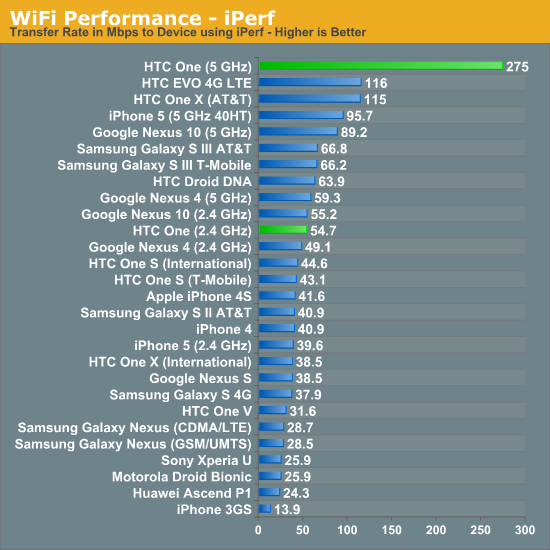
    Wi-Fi is where the HTC One really excels, due to being the first smartphone on the market to support the next generation Wi-Fi - 802.11ac. This means that it supports 80MHz channels and a higher maximum PHY rate of 433 Mbps. The support comes from the new Broadcom BCM4335 chip, which also supports Bluetooth 4.0 and FM Radio. The Galaxy S4 only features the BCM4329. This new chip could potentially increase battery life due to a shorter duty cycle for the same throughput amount. The chip also has better range.

    Picture source: www.anandtech.com

    RAM / ROM memory

    The HTC One comes with 2GB of LPDDR2 RAM. This is a boost from the 1GB found in the One X. Applications can cache more with a greater amount of RAM, and this can improve both scrolling and multitasking. The multitasking screen on the One has room for 8 app previews, and you can be pretty safe in saying that at least 6 of these will still be cached and ready to jump straight back into. Android handles multitasking differently to on iOS, and allows things to really run in the background. This means that downloads can continue if the app is closed, and that a YouTube video can continue to play if you leave the browser. One negative point of the RAM is that it is still using LPDDR2, while the Galaxy S4 is using the newer LPDDR3 RAM. This offers more memory bandwidth, and means that the RAM is faster at caching and loading from cache. This means a slicker multitasking experience. Despite this, the Galaxy S4 doesn't show much of an advantage in real world use.

    The HTC One is available in two storage variants - 32GB and 64GB. There are some users saying even 64GB is not enough, but for most average users 32GB is more then they need. Keep in mind that neither HTC One or any other Android device was not created to be media storage. For that purpose we recommend buying mini-PC with at least 1TB HDD drive.

    Modem variants

    There are a few HTC One models available currently on the market. The main difference between them is the modem version and their capabilities to run under particular network frequencies. For more information on this matter please visit this thread - HTC One variants.


    Conclusion

    In conclusion, the HTC One has proven itself to be top of the Android class, and thoroughly deserves its extended period as PhoneDog #1 smartphone. The build quality is second to none, and the overall specs definitely don't fall short. On paper, the phone is a beast, but in the hand it's more of a beauty. 


    Hardware Summary:

    + High-end Snapdragon 600 SoC
    + 2GB of RAM memory
    + Impressive camera capabilities with HTC Zoe feature
    + IR (infra-red spectroscopy)
    + BoomSound stereo speakers
    + 2300 mAh battery
    + Excellent full HD SLCD3 screen with 468PPI
    + Next generation 802.11ac Wi-Fi modem
    + GNSS support
    + Effective cooling system with aluminium unibody

    - No LPDDR3 RAM memory
    - No Gorilla Glass 3
    - Only two capacitive buttons instead of three
    - Under-clocked CPU (from 1.9 to 1.7 GHz)


    Here are the official specifications of the HTC One:
    • 4.7-inch Full HD 1080p SLCD3 @ 468PPI
    • Gorilla Glass 2.0
    • 1.7 GHz Quad Core Snapdragon 600 (Krait 300 core)
    • 2GB LPDDR2 memory
    • 32GB/64GB internal storage (without SD-card slot)
    • Full Aluminium Unibody
    • MicroSIM card 
    • 2300 mAh Li-Polymer Embedded battery (non replaceable)
    • Bluetooth 4.0 with aptX enabled
    • NFC Capable
    • Internal GPS antenna + GLONASS
    • Wi-Fi: IEEE 802.11 a/ac/b/g/n
    • Infrared Remote Support
    • Micro-USB 2.0 (5-pin) port with mobile high-definition video link (MHL) for USB or HDMI connection
    Camera:
    • HTC UltraPixel Camera (4MP)
    • BSI sensor, Pixel size 2.0 µm, Sensor size 1/3'
    • Dedicated HTC ImageChip™ 2
    • F2.0 aperture and 28 mm lens
    • Optical Image Stabilization (OIS)
    • Smart Flash: Five levels of flash automatically set by distance to subject
    • Front Camera: 2.1 MP, 880 wide angle lens with HDR capability
    • 1080p Full HD video recording for both front and back cameras
    • HDR Video
    Sound:
    • Dual frontal stereo speakers with built-in amplifiers (HTC BoomSound™)
    • Studio-quality sound with Beats Audio™
    • HDR Microphone
    Network:
    • HSPA/WCDMA:
    • Europe/Asia: 850/900/1900/2100 MHz
    • GSM/GPRS/EDGE:
    • 850/900/1800/1900 MHz
    • LTE: (optional)
    • EU: 800/1800/2600 MHz
    • US (AT&T): 700/850/AWS/1900 MHz
    • US (TMO): 700/AWS MHz
    • US (Sprint): 1900 MHz
    • Asia: 1800/2600 Mhz

    Have any questions or comments? Feel free to share! Also, if you like this article, please use the media sharing buttons (Twitter, G+, Facebook) under this post!

    Stock system dumps for HTC One & HTC One X


    Last two days were very exciting for HTC community, especially for HTC One X users (Android 4.2.2 with HTC Sense 5.0 update described here). However, there is always one problem when it comes to HTC updates - no RUUs (ROM Update Utility) officially available do download for regular users (HTC One Developer Edition and Google Edition seems to be the only exceptions). Why RUU is that important to us?

    These executable (.exe) files for MS Windows are installers of complete firmware, including for example system or data partitions. Not having latest RUU means:
    1. users using custom ROMs can't download latest OTA from HTC,
    2. developers have no system dumps they can work with.
    Ad. 1) If you want to download and flash latest OTA, your device must have completely stock system partition and recovery. Every OTA update is checking MD5 of each file on system partition to ensure .apk patch can be applied. If even one of 1000 files won't match, OTA update installation will fail. In this case you need to flash the latest official update you can find (even one year old) and later download official OTA updates.

    Ad. 2) There are few workarounds, however none of them is as good as having a RUU:
    • adb pull /system in custom recovery mode*
    • cp /system /data/media/dump in custom recovery mode*
    • nandroid backup
    • boot partition can be taken from inside firmware.zip inside OTA .zip package or it can be dumped using dd if=</path/to/boot/partition> of=/data/media/boot.img
    * adb pull, cp or dd commands must be executed from custom recovery mode, otherwise system dump will be missing few important files or these files will have 0kb size. Also, keep in mind that adb features are heavily limited on stock un-rooted device. In case of dd command, root access (su) is needed to make such operation.

    That's why I created my own stock system dumps (as a custom recovery .zip packages) for both HTC One and HTC One X. I believe this can save a lot of time for many XDA users and developers.


    Download links can be found on this blog, under Downloads section - Downloads


    Have any questions or comments? Feel free to share! Also, if you like this article, please use media sharing buttons (Twitter, G+, Facebook) down this post!

    HTC One X with Android 4.2.2 & HTC Sense 5.0 update

    HTC One X is one of the very few (if not the only one) devices from HTC which reached 4.xx.xxx.x software version (4.18.491.2). This only proves how great this device still is and how many users are still actively using it. Today HTC One X users are receiving one of the most important update - Android 4.2.2 with HTC Sense 5.0. Last summer HTC did similar update, upgrading HTC One X with Android 4.1.1 from Android 4.0.4 and bumping HTC Sense from 4.0 to so called "4+". However, HTC Sense 4.0/4+ update wasn't that significant and didn't bring so many new features and improvements as HTC Sense 5.0.


    The new update includes well known HTC BlinkFeed™ (available firstly only on HTC One), native Android Quick Settings and completely re-designed HTC Sense interface. Two features are missing from HTC One - HTC BoomSound™ and HTC Zoe™. Unfortunately, both are hardware related. BoomSound™ obviously needs dual speakers audio system, and HTC Zoe™ was created to work with small pictures taken with UltraPixel camera - which allows user to take excellent pictures in natural conditions using only 4 mega pixels resolution in pair with dedicated HTC ImageChip™ 2.


    As you can see, there is a changelog attached to the OTA notification, however it is just a "commercial" changelog - that means there are a lot of different changes/improvements under the hood. Android 4.2.2 update brought a lot of changes itself, not to mention new HTC Sense 5.0 features, further optimization in SoC drivers and kernel related improvements.


    The new update for HTC One X looks great and surely will bring some fresh air to the device. HTC One X+ already received HTC Sense 5.0 update few days ago, however it was only Taiwanese update so far. Below you can see HTC BlinkFeed screen together with Android Quick Settings on latest HTC One X 4.18.401.2 software.


    Have any questions or comments? Feel free to share! Also, if you like this article, please use media sharing buttons (Twitter, G+, Facebook) down this post!

    Do you want to write on Android Revolution HD blog?

    It's time to expand. This place has a potential and I want it to become even more popular. If you are interested in making this place even better and more crowded, please keep reading!

    So, what I am looking for?

    Strong written English
    This is essential. It's fine if English isn't your first language, it's not if I have to rewrite all your posts. Your grammar and variety of vocabulary must be at an advanced level.

    Good understanding of mobile tech and an attention to detail
    Know the areas you want to write about, know the sources and strive for accuracy. Your articles must have some particular level of quality, otherwise it can't be published.

    Have an opinion
    Re-posting news from other tech-sites is not welcomed. You need to be able to understand what things mean, put it in context and share your thoughts with our readers. I'm more interested in creating the opinion rather then passing some news along.

    Regular contribution
    This isn't a job offer, but this might change in the future. For now I want to create a friendly place where dedicated people can share their thoughts (and there is a lot to share nowadays). I ask that all applicants are able to post on average 1-2 times a week. News posts don't have to be thousands of words, in most cases a couple of hundred will suffice.

    Technologies
    I'm mostly interested in Android / Windows Phone articles, however the variety of potential topics is: "Linux Kernels" | "Linux General" | "Android General" | "Android Devices" | "Windows Devices" | "Other OS Devices" | "Tablets" | "Gadgets" | "Manufacturers News" | "PC News" | "your idea".


    There is no age limitation. Everyone can have hobby and be addicted to gadgets :)

    How to apply
    Please send me an e-mail with some details about you. Where are you from, how old are you, what topic are you most interested in, and if you've been writing any sort of articles/news before.

    EHNDROIX III 13.8.6 - i9001


    EHNDROIX III is an aftermarket firmware based on CyanogenMod 10.1,created by Nitrox-developers Team. Edited and customized to the smallest details, is designed to provide users with an Jelly Bean user-friendly experience and is available for a wide range of terminals !


    The ROM has been optimized to ensure maximum fluidity and at the same time good battery life and, thanks to Nitrox S, you will have the opportunity to stay up to date on the latest news and download launchers, themes "exclusive" mod and much more ! 


    Features

    • Based on CyanogenMod 10.1
    • New theme with new exclusive EhndroiX styles
    • Update the ROM directly from your device with integrated OTA Updater
    • Official bootanimation
    • Use EhndroGapps, refined gapps and in Black or White style
    • Apex Launcher
    • FM Radio Included
    • Flash Player Support
    • No more ads in the apps
    • Send messages with exclusive EhndroiX app with a very attractive look and new features
    • Exceptional audio quality and volume thanks to Sony xLoud and ClearAudio
    • Striking Images Quality thanks to Sony Bravia Engine 2 and a better density
    • See HD videos via 3G or Wi-Fi by Inverted YouTube modded for continuing to use whit the screen off
    • Fantastic Official EhndroiX Wallpapers
    • GPS ultra running in all countries due to the automatic fix satellites
    • ROM in constant development (keep up to date thanks to date version)
    • Keep safe your data with Titanium Backup installed by default
    • ... and much more!


    Guide to proper Installation

    Coming from a previous EHNDROIX III:
    • Download ROM
    • Download EhndroGapps
    • Wipe Cache
    • Wipe Dalvik / Cache
    • Flash EhndroiX III
    • Flash EhndroGapps
    • Restart

      Coming from EHNDROIX II or EHNDROIX /CM7/CM9/CM10/AOKP/MIUI:
      • Download ROM
      • Download EhndroGapps
      • Wipe Data
      • Wipe Dalvik Cache
      • Flash EhndroiX III
      • Flash EhndroGapps
      • Restart


      Changelog


      13.8.6
      • Changed base to CyanogenMod 10.1 RC5 by ADC Team
      • Changed kernel to K^Kernel 1.9 ( Linux Base 3.4.56 )
      • Rom built with Google GCC 4.9 Toolchain
      • System Improvement
      • Better Fluidity
      • Better Battery Drain
      • Better Data Connection
      • Updated Default Apps
      • Updated White and Black EhndroGapps
      • Sync to lastest CyanogenMod sources
      • And a lot of other news !!!


      13.7.17
      • Changed base to CyanogenMod 10.1 RC4.6 by Davidteri
      • Changed kernel to K^Kernel 1.7 ( Linux Base 3.4.53 )
      • Rom built with Google GCC 4.9 Toolchain
      • AriesParts of CyanogenMod 10.1 RC4 by ADC Team 
      • Added Android 4.3 Camera
      • Added Android 4.3 Sun Bean Live Wallpaper
      • Samsung Galaxy S IV Style Package Available
      • System Improvement
      • Better Fluidity
      • Better Battery Drain
      • Better Data Connection
      • Updated Default Apps
      • Updated White and Black EhndroGapps
      • Sync to lastest CyanogenMod sources
      • And a lot of other news !!!


      13.7.9
      • Changed base to CyanogenMod 10.1 RC4 by ADC Team 
      • Changed kernel to PhenomKernel 4.3 ( Linux Base 3.4.51 )
      • Rom built with Google GCC 4.6 toolchain
      • AriesParts: Corrected German translation
      • AriesParts: Corrected Spanish translation
      • AriesParts: Serbian translation
      • AriesParts: Show the value of vibration strength in percentage instead of the value of the driver
      • AriesParts: Updated cm device settings with tab layout
      • Revert back to system defined dalvik heap)
      • Set resampler quality
      • Fix audio in Hangouts
      • Remove custom oncrpc node permissions 
      • Clean out unused code from liblights
      • Put back dalvik.vm.dexopt-data-only=1
      • Enabled world phone menu
      • Enable volume rocker and home button wake preferences
      • Added PhotoTable live wallpaper
      • AriesParts: Chinese translation
      • AriesParts: Romanian translation
      • AriesParts: Polish translation
      • AriesParts: Spanish translation
      • Updated Default Apps
      • Updated White and Black EhndroGapps
      • Sync to lastest CyanogenMod sources
      • And a lot of other news !!!

      13.6.24
      • Changed base to CyanogenMod 10.1 RC2 by ADC Team 
      • Changed kernel to K^Kernel 1.4 ( Linux Base 3.4.50 )
      • Temporary workaround for flicker brightness after screen on 
      • Battery drain fix for WIFI "Disabled SUPPORT_PM2_ONLY and DISABLE_FW_ROAM_SUSPEND"
      • Fixed data CRC errors for WIFI
      • Updates and fixes to Interactive CPU governor
      • Squashed update of BFQ-V6 to BFQ-v6r2
      • Corrected an unmanaged gamma for autobrightness
      • Customizable timeout for touchkeys backlight
      • Added AccuWeather
      • Removed Yahoo Weather
      • Customizable activation status of touchkeys backlight on touchscreen press 
      • Fix for discharging battery issue while charging to 100%
      • Updated Default Apps
      • Updated White EhndroGapps
      • Sync to lastest CyanogenMod sources
      • And a lot of other news !!!

      13.5.31
      • Base updated to CyanogenMod 10.1 Beta 6.3.5 by davidteri91
      • Kernel updated to Linux Base 3.4.47
      • Fixed Problem with Camera
      • Fixed Wi-Fi Thetering
      • Updated CameraHAL
      • Update BoardConfig
      • Added Global Gps Fix No SSL
      • System Improvement
      • Data Connection Improved
      • Bluetooth Connection Improved
      • New driver autobrightness sensor
      • Updated Display and Media legacy
      • GPS Connection Improved
      • Updated EhndroGapps ( slimmed and changed installation script )
      • Updated default apps
      • Sync to lastest CyanogenMod sources
      • And other news !!!


      13.5.19
      • Update base to CyanogenMod 10.1 Beta 6.2.1 by davidteri91
      • Change kernel into K^Kernel 1.9 ( Linux Base 3.0.78 )
      • ROM Reworked from zero
      • New Bootanimation
      • Graphic Update
      • System Improvement
      • Better Data Connection
      • Fixed Bluetooth 
      • Fixed Google Maps soft reboot
      • New driver autobrightness sensor
      • Updated Display and Media legacy
      • Better GPS Connection
      • Updated EhndroGapps [ only white version, beacuase there are a lot of newest apps not yet in black version )
      • Updated default apps
      • Sync to lastest CyanogenMod sources
      • And other news !!!


      13.4.29
      • Update base to CyanogenMod 10.1 Beta 4.5 by davidteri91
      • ROM Reworked from zero
      • System Improvement
      • Better Data Connection
      • Fix Audio Call
      • Fix Edge Connection 
      • New driver autobrightness sensor and update display driver from SGS2
      • HWC branch now called CM-10.1 compiled Display and Media legacy
      • Now ROM uses Samsung Camera Legacy
      • Added SD storage in stock camera app
      • Better GPS Connection ( Don't use Maps. It is bugged in CyanogenMod 10.1 )
      • Updated default apps
      • Sync to lastest CyanogenMod sources
      • And other news !!!

      13.4.19
      • Update base to CyanogenMod 10.1 Beta 3.5 by davidteri91
      • ROM Reworked from zero
      • System Improvement
      • Better Fluidity ( Never seen before - Very,very fluid)
      • Better Battery Drain
      • Better Data Connection
      • AddedHWC 1.1 Display and Media legacy
      • 30FPS Preview Videocamera
      • New Drivers 3D By Qualcomm ( Fantastic Performance )
      • Better Data Connection
      • Better Battery Drain
      • Better Wi-fi Signal
      • Better GPS Connection
      • Updated default apps
      • Sync to lastest CyanogenMod sources
      • And a lot of other news !!!


      13.4.13
      • Update base to CyanogenMod 10.1 Beta 2.4 by davidteri91
      • Change kernel into Phenom Kernel 3.6 ( Linux Base 3.0.73 )
      • Added EhndroiX III Official Bootanimation
      • Changed some sytem sounds with Samsung Galaxy S IV 's ones
      • Added Universal CleanerScript ( flash in recovery for remove tweaks *Only for how have laggy phone )
      • Added Google Keep
      • System Improvement
      • Better Fluidity
      • Better Battery Drain
      • Better Data Connection
      • Little Graphic Update
      • New display drivers from Samsung Galaxy S II
      • Fixed Button Edit inor remove emmc brick bug
      • Fixed preview videos 480p
      • Fixed universal WEP
      • Fixed Android Keyboard
      • Fixed glitch in frontal camera 
      • Enable WEBGL
      • Updated RIL
      • Updated default apps
      • Updated and added new apps in EhndroGapps
      • Sync to lastest CyanogenMod sources
      • And a lot of other news !!!

      13.4.2
      • Update base to CyanogenMod 10.1 Beta 1 by Xistance
      • Change kernel into Phenom Kernel 3.2.1 ( Linux Base 3.0.71 )
      • Added EhndroiX III Official Bootanimation
      • Added Google Keep
      • Changed some sytem sounds with Samsung Galaxy S IV 's ones
      • Graphic Update
      • Fixed Bluetooth
      • Fixed RIL problems
      • Vsync fully working
      • Fixed WiFi tethering
      • Fixed Bluetooth tethering
      • Fixed USB tethering
      • Removed MIUI Notes
      • Updated default apps
      • Updated EhndroGapps
      • Sync to lastest CyanogenMod sources
      • And a lot of other news !!!

      ___________________________________

      Download: Last ROM Release

      Download: Black and White EhndroGapps 4.2.2
      Download: S IV Style Universal Pack
      Download: LG Style Universal Pack
      Download: NitroX-developers Bootanimations Pack


      (This ROM is certified Nitrox-developers but the staff does not assume any responsibility for any damage to your device)

      New feature on xda-developers - "XDA: DevDB"

      Recently xda-developers presented new forum feature: Development Database, or DevDB for short.

      Here is a short list of what is actually does:
      • Download manager with an XDA torrent tracker
      • ROMs can have multiple "contributors" who can make changes, add files, etc.
      • Ability to tag ROMs (so they are searchable for users)
      • Screenshot management
      • Ability to reserve up to two posts in your ROM thread (below the first post)
      • ROM reviews
      • Q&A thread association
      • Bug tracker / feature requester
      • ROMs will be flashable directly from DevDB *coming soon*
      • Users can "follow" a ROM and get auto-notified of updates

      Of course it's not only about ROMs. Any developer can add f.g. kernel project too.

      What I find interesting so far is the possibilities to write a short reviews and follow the project. Everyone can also contribute by writing some idea for some new feature or submit a bug in a bug tracker.

      If you have free 5 minutes (it's how much it takes!) please take a look at this new system and follow my HTC One "project" under this link - follow project (if you are HTC One owner) and leave your review for my HTC One ROM under this link - write a short review.

      The project is currently in beta stage, and number of supported devices is limited to:

      Galaxy S II, III, and 4
      HTC One

      Sony Xperia Tablet Z
      Sony Xperia Z
      Droid DNA
      Nexus 4, 10, 7
      Galaxy Note II

      Personally I think that DevDB is a great idea, however it surely needs some time before users and developers will get used to it.

      Have any questions or comments? Feel free to share! Also, if you like this article, please use media sharing buttons (Twitter, G+, Facebook) down this post!

      EHNDROIX III 13.7.20 - i9003


      EHNDROIX III is an aftermarket firmware based on CyanogenMod 10.1,created by Nitrox-developers Team. Edited and customized to the smallest details, is designed to provide users with an Jelly Bean user-friendly experience and is available for a wide range of terminals !


      The ROM has been optimized to ensure maximum fluidity and at the same time good battery life and, thanks to Nitrox S, you will have the opportunity to stay up to date on the latest news and download launchers, themes "exclusive" mod and much more ! 


      Features

      • Based on CyanogenMod 10.1
      • New theme with new exclusive EhndroiX styles
      • Update the ROM directly from your device with integrated OTA Updater
      • Official bootanimation
      • Use EhndroGapps, refined gapps and in Black or White style
      • Apex Launcher
      • FM Radio Included
      • Flash Player Support
      • No more ads in the apps
      • Send messages with exclusive EhndroiX app with a very attractive look and new features
      • Exceptional audio quality and volume thanks to Sony xLoud and ClearAudio
      • Striking Images Quality thanks to Sony Bravia Engine 2 and a better density
      • See HD videos via 3G or Wi-Fi by Inverted YouTube modded for continuing to use whit the screen off
      • Fantastic Official EhndroiX Wallpapers
      • GPS ultra running in all countries due to the automatic fix satellites
      • ROM in constant development (keep up to date thanks to date version)
      • Keep safe your data with Titanium Backup installed by default
      • ... and much more!


      Guide to proper Installation

      Coming from a previous EHNDROIX III:
      • Download ROM
      • Download EhndroGapps
      • Wipe Cache
      • Wipe Dalvik / Cache
      • Flash EhndroiX III
      • Flash EhndroGapps
      • Restart

        Coming from EHNDROIX II or EHNDROIX /CM7/CM9/CM10/AOKP/MIUI:
        • Download ROM
        • Download EhndroGapps
        • Wipe Data
        • Wipe Dalvik Cache
        • Flash EhndroiX III
        • Flash EhndroGapps
        • Restart


        Changelog


        13.7.20
        • First Release for i9003!

        ___________________________________

        Download: Last ROM Release

        Download: Black and White EhndroGapps 4.2.2
        Download: S IV Style Universal Pack
        Download: LG Style Universal Pack
        Download: NitroX-developers Bootanimations Pack


        (This ROM is certified Nitrox-developers but the staff does not assume any responsibility for any damage to your device)

        EHNDROIX III 13.7.18 - i9100


        EHNDROIX III is an aftermarket firmware based on CyanogenMod 10.1,created by Nitrox-developers Team. Edited and customized to the smallest details, is designed to provide users with an Jelly Bean user-friendly experience and is available for a wide range of terminals !


        The ROM has been optimized to ensure maximum fluidity and at the same time good battery life and, thanks to Nitrox S, you will have the opportunity to stay up to date on the latest news and download launchers, themes "exclusive" mod and much more ! 


        Features

        • Based on CyanogenMod 10.1
        • New theme with new exclusive EhndroiX styles
        • Update the ROM directly from your device with integrated OTA Updater
        • Official bootanimation
        • Use EhndroGapps, refined gapps and in Black or White style
        • Apex Launcher
        • FM Radio Included
        • Flash Player Support
        • No more ads in the apps
        • Send messages with exclusive EhndroiX app with a very attractive look and new features
        • Exceptional audio quality and volume thanks to Sony xLoud and ClearAudio
        • Striking Images Quality thanks to Sony Bravia Engine 2 and a better density
        • See HD videos via 3G or Wi-Fi by Inverted YouTube modded for continuing to use whit the screen off
        • Fantastic Official EhndroiX Wallpapers
        • GPS ultra running in all countries due to the automatic fix satellites
        • ROM in constant development (keep up to date thanks to date version)
        • Keep safe your data with Titanium Backup installed by default
        • ... and much more!


        Guide to proper Installation

        Coming from a previous EHNDROIX III:
        • Download ROM
        • Download EhndroGapps
        • Wipe Cache
        • Wipe Dalvik / Cache
        • Flash EhndroiX III
        • Flash EhndroGapps
        • Restart

          Coming from CM7/CM9/CM10/AOKP/MIUI:
          • Download ROM
          • Download EhndroGapps
          • Wipe Data
          • Wipe Dalvik Cache
          • Flash EhndroiX III
          • Flash EhndroGapps
          • Restart


          Changelog


          13.7.18
          • Added Android 4.3 Camera
          • Added Android 4.3 Sun Bean Live Wallpaper
          • Samsung Galaxy S IV Style Package Available
          • System Improvement
          • Better Fluidity
          • Better Battery Drain
          • Better Data Connection
          • Better GPS Signal
          • Updated Default Apps
          • Updated White and Black EhndroGapps
          • Sync to lastest CyanogenMod sources
          • And a lot of other news !!!

          ___________________________________

          Download: Last ROM Release

          Download: Black and White EhndroGapps 4.2.2
          Download: S IV Style Universal Pack
          Download: LG Style Universal Pack
          Download: NitroX-developers Bootanimations Pack


          (This ROM is certified Nitrox-developers but the staff does not assume any responsibility for any damage to your device)